Understanding Journal Mode in Real-Time Replication
In VMware environments, replication can be implemented using one of two modes for handling I/O changes: snapshots or journaling. Each approach has advantages and disadvantages. The key differences lie in how they manage data consistency, change tracking and recovery.
With the snapshot approach, VM replication occurs at scheduled intervals, so any changes made after the last snapshot (taken for VM replication) and before a VM failure can be lost. In contrast, the journal mode captures every write operation in real time and stores it in a journal, enabling recovery to any point in time. This mode is used for real-time replication to minimize data loss for critical workloads. This blog post explains how the journal mode works for real-time replication of VMware virtual machines.

What Is Journal Mode in Real-Time Replication?
The journal mode for real-time replication is a method that tracks and logs every change made to the primary VM in a continuous stream or near real-time manner. The logged changes recorded in the journal are applied to the VM replica incrementally, which provides the ability to perform VM recovery using the replica to specific points in time. Real-time replication with journal mode is used to ensure zero or near-zero data loss. Real-time replication is also called continuous replication.
How Journal Mode Works
The working principle of the journal mode for real-time replication includes the following main stages:
- Change tracking. A journal is created to log all modifications to the primary VM’s state, including disk writes and configuration changes. Changed Block Tracking (CBT) is the technology used to track changes for virtual disks of virtual machines in VMware vSphere.
- Data streaming. Tracked changes are captured in the journal and streamed or batched to the replica VM over the network. The journal is stored either temporarily in memory or on disk, depending on the configuration and workload.
- Applying changes. The replica VM processes these incremental updates to keep its state synchronized with the primary VM.
- Granular recovery. The journal retains the history of changes, allowing the replica VM to be rolled back or restored to any point within the retention period defined by the journal (e.g., minutes, hours, or days).
Note that journal mode is not a native feature in VMware but rather a feature implemented by third-party solutions – unlike “snapshotting”, which is a native VMware feature. The journal mode for real-time replication of VMware VMs is supported, for example, in the universal data protection solution NAKIVO Backup & Replication.
Records of input/output (I/O) operations are recorded on a per-disk basis for replicated VMs in NAKIVO Backup & Replication. A new journal extent is created in the I/O journal for every real-time replication run. There are internal logical parts of the journal extent that contain 256 MB of data, which are called frames. A journal extent can contain one or more frames. Frames can contain up to 65536 data blocks and each block contains 4096 bytes of data.
Key features of Journal Mode
The journal mode for real-time VM replication has the following key features:
- Continuous synchronization. The primary VM changes are continuously logged, ensuring near-real-time replication to the replica VM.
- Granular point-in-time recovery. The journal provides fine-grained recovery options, enabling restoration to any state within the journal’s retention window. This is useful for recovery after failures, including data corruption or accidental deletions.
- Flexible retention period. The storage duration of the journal logs depends on the system’s storage capacity and configuration. Shorter retention periods reduce storage needs but limit recovery points.
Journal Mode Benefits
Real-time replication with the journal mode provides the following benefits:
- Minimal data loss. Real-time replication with Journal mode allows you to achieve zero or near-zero recovery point objectives (RPO) due to continuous tracking and replication.
- Fine-grained recovery. The ability to recover to specific points in time offers flexibility for disaster recovery.
- Efficiency. Real-time replication with Journal mode replicates only changes rather than entire VM states or snapshots, reducing replication time and resource usage.
It is important to mention that real-time replication using journal mode has higher system requirements than traditional replication using snapshot mode. A high-speed and low-latency network connection is required for real-time VM replication using journal mode. Software configuration is also more complex compared to traditional asynchronous replication.
Comparison: Journal Mode vs. Traditional Replication
Journal mode and traditional mode for VM replication differ in terms of data loss in case of failure, system requirements, configuration complexity and use cases.
Traditional replication using snapshot mode operates by periodically creating snapshots to copy the VM state from the source VM to the replica VM. The minimum interval between snapshot creation in data protection applications can be a few minutes. This means that the data written to the original VM after creating a VM snapshot can be lost if the original VM fails. Snapshot-based replication is optimal for VMs when the recovery point objective (RPO) is not strict. The advantages of traditional snapshot-based VM replication are ease of configuration and light system requirements that make this method affordable for most organizations.
Journal mode used for real-time replication or continuous replication operates with a continuously updated journal and these updates are continuously replicated from the source VM to the VM replica. As a result, the latest changes are always replicated and in case of VM failure, the latest state of the VM can be restored using the VM replica. Real-time replication with journal mode is used for critical VMs with tight RPO values. This replication type has higher system requirements and costs when implementing this solution. That’s why this replication type should be used primarily for critical VMs.
You can check the main aspects of replication using snapshot mode and journal mode in the comparison table below.
|
Aspect |
Snapshot Mode |
Journal Mode |
|
Replication frequency |
Periodic, based on snapshot intervals |
Continuous or near real-time |
|
Data loss risk (RPO) |
Higher, depends on snapshot frequency |
Minimal, near-zero RPO |
|
Recovery options |
Limited to specific snapshot points |
Granular recovery to any point in time |
|
Performance impact |
Can affect VM performance during snapshots |
Higher network/storage resource usage |
|
Use case examples |
Non-critical workloads, DR, backups |
Mission-critical systems, real-time disaster recovery |
How to Set Up Real-Time Replication Journal Mode in NAKIVO
First, you need to install the Journal Service and then you can configure its options to perform a real-time replication job for VMware VMs.
Journal service installation
Target ESXi hosts where VM replicas (made with the real-time replication feature) should be located must contain a VMware virtual appliance with the NAKIVO Transporter to install or configure the Journal service.
To install the real-time replication journal service automatically (starting with NAKIVO Backup & Replication v11.1), follow the steps below:
- Complete the Real-Time Replication Job Wizard to create a new real-time VMware VM replication job.
- After the Real-Time Replication Job Wizard completion:
- The NAKIVO solution installs the journal service on the required transporter virtual appliances (VAs) that do not have the journal service.
The journal service is installed on /opt/nakivo/journalservice with 755 permission and it runs under the “bhsvc” user (“bhsvc” group). - Journal services on multiple transporter VAs are installed simultaneously (up to 10 VAs at a time).
- In case a target host has multiple transporter VAs, the product will use the first VA in the list to install the journal service.
- The NAKIVO solution installs the journal service on the required transporter virtual appliances (VAs) that do not have the journal service.
To install the Journal service manually (available from v10.10), perform the following steps:
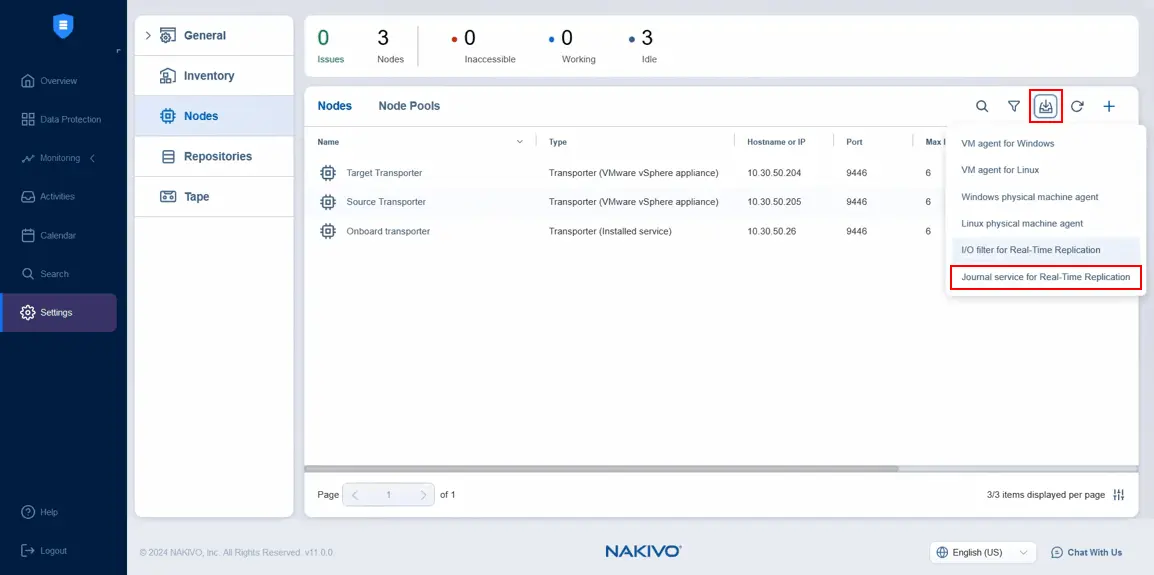
- To download the Journal Service installer, open the web interface of NAKIVO Backup & Replication, go to Settings > Nodes, click the Download icon and hit Journal service for Real Time Replication.
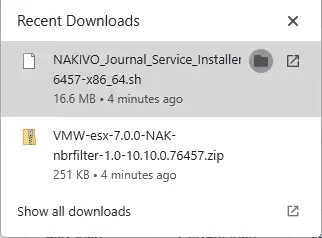
The NAKIVO virtual appliance for VMware vSphere is based on Ubuntu Server and the journal service installer has the .sh file extension. The version number in the file name depends on your version and build of NAKIVO Backup & Replication.
- Copy the downloaded installer to the virtual appliance running in VMware vSphere. You can use an SCP client for this purpose.
- Go to the directory where the Journal service installer file is located on the NAKIVO virtual appliance.
- Add the executable permissions with the following command:
sudo chmod +x ./NAKIVO_Journal_Service_Installer_11.2.3.sh - Run the Journal service installer:
sudo ./NAKIVO_Journal_Service_Installer_11.2.3.sh --eula-accept - To ensure that the installation was successful and the Journal service is running, use the command:
systemctl status nkv-journalsvcThe installation log is located in /tmp/nkv-journalsvc-install.log
Journal settings for a replication job
When all requirements are met (such as ESXi cluster, I/O filter, etc.) and all components are configured in your environment, you can create a real-time replication job for VMware VMs.
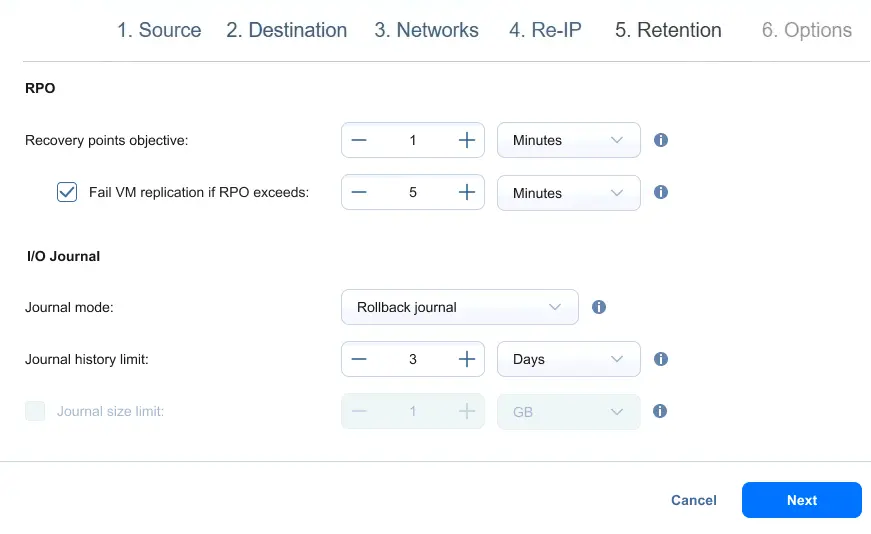
The I/O journal settings for a real-time VMware replication job can be configured at the Retention step.
You can configure the following I/O Journal settings:
- Journal mode:
- Rollback journal. New data changes are saved directly to the VM replica. Old data in the VM replica is saved to the journal. Old data is removed from the journal according to the journal settings, such as the history limit.
- Roll forward journal. New data changes are saved to the I/O journal. Old data is merged to the VM replica based on the settings.
- Journal history limit. Optionally, you can set a limit for journal history. The range is between 1 hour and 30 days.
- Journal size limit. You can set this limit between 1 GB and 20 TB. If the journal size limit is not set, it will be equal to the size of the datastore. If this datastore is larger than 20 TB, the journal size will be limited to 20 TB.
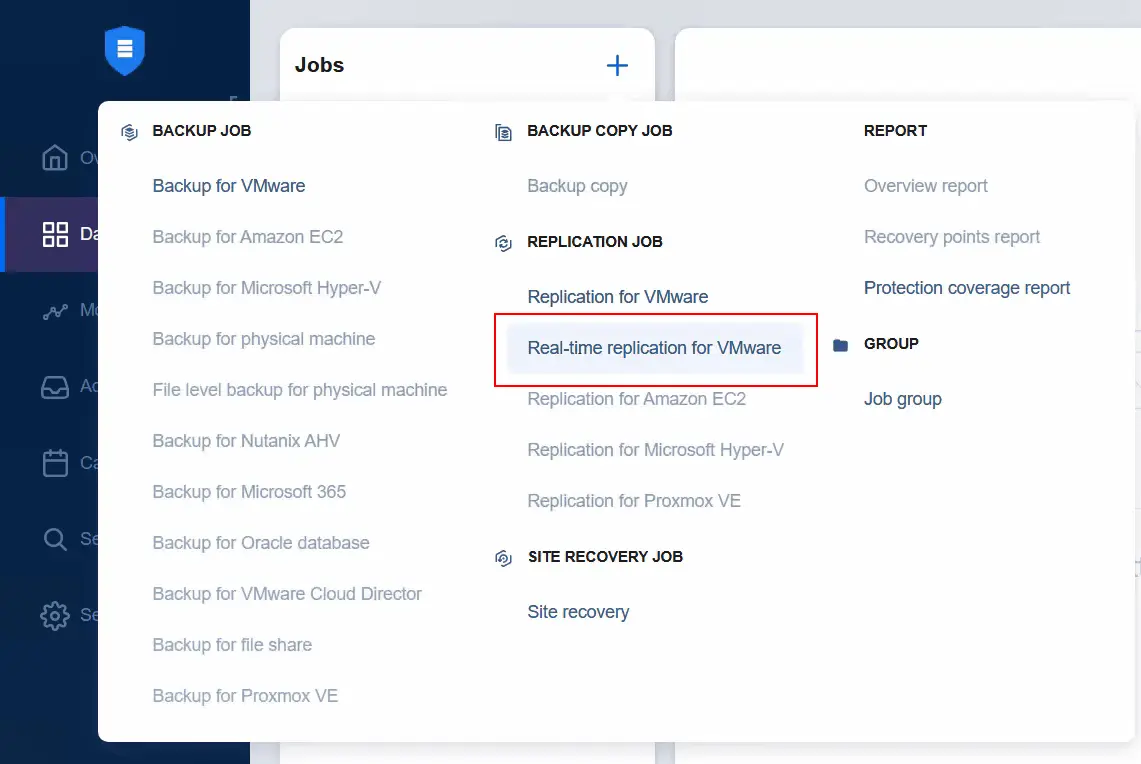
Read more about real-time replication and its full configuration to protect virtual machines in VMware vSphere.
Conclusion
The journal mode enables you to leverage real-time replication for virtual machines, thereby achieving the shortest recovery point objectives for critical VMs. At the same time, using traditional replication with snapshots for VMs where RPO requirements are not that high can be more cost-efficient. Use NAKIVO Backup & Replication to protect your data with traditional VM replication and real-time replication.